

false

02K6572 - 3V RTC CMOS Backup Battery with Cable and Connector for ThinkPad A20 A21 A22 A30 A31 T20 T21 T22 T23 T30 T42 T43

Item#: 02K6572 Condition: New
On Sale $35.00
In Stock
Usually Ships in 2-3 Business Days
Money Back Guarantee
Not satisfied? Send it back!
Request a quote below to see price
REQUEST A QUOTE
02K6572 - 3V RTC CMOS Backup Battery with Cable and Connector for ThinkPad A20 A21 A22 A30 A31 T20 T21 T22 T23 T30 T42 T43

02K6572 - 3V RTC CMOS Backup Battery with Cable and Connector for ThinkPad A20 A21 A22 A30 A31 T20 T21 T22 T23 T30 T42 T43

Item#: 02K6572

* Indicates a required field

  • Product Description
  • Compatible Models
Product Description

02K6572 - 3V RTC CMOS Backup Battery with Cable and Connector for ThinkPad A20 A21 A22 A30 A31 T20 T21 T22 T23 T30 T42 T43

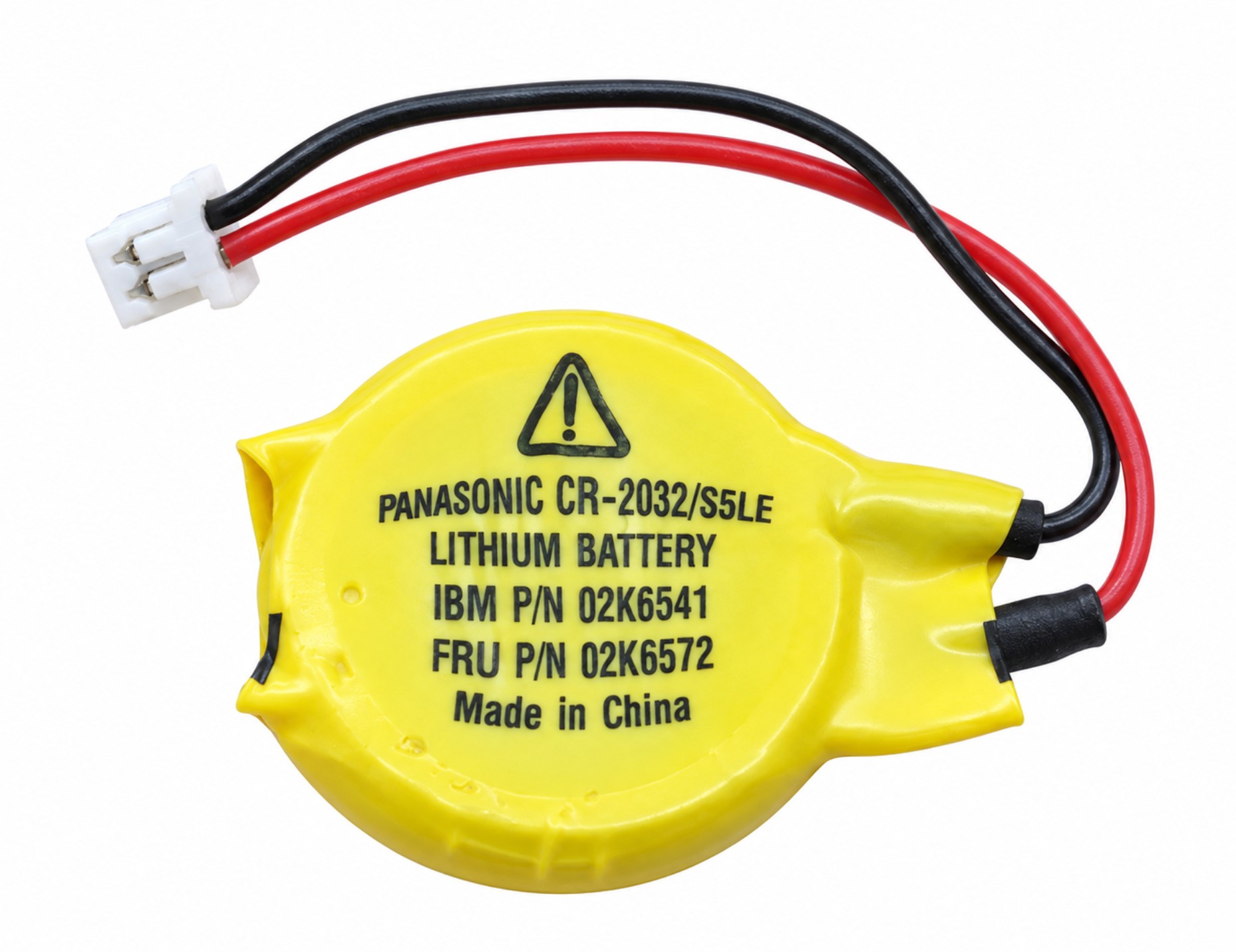
This 02K6572 RTC CMOS backup battery supplies standby power to the real-time clock and battery-backed system settings in compatible ThinkPad notebooks. It helps maintain the date, time, and applicable BIOS settings while the computer is disconnected from its main power sources.

The assembly includes an insulated lithium coin cell, attached wiring, and a motherboard connector for installation in systems using the matching 02K6572 battery configuration.

Technical Specifications

  • Product Type: RTC CMOS backup battery assembly
  • Service Part Number: 02K6572
  • Nominal Voltage: 3V DC
  • Battery Chemistry: Primary lithium
  • Rechargeable: No
  • Assembly Type: Insulated coin cell with attached cable and connector
  • Connection: Two-wire lead with two-position motherboard connector
  • Primary Function: Real-time clock and battery-backed settings retention
  • Installation Location: Internal motherboard RTC battery connection
  • Application: Compatible ThinkPad notebooks specifying the 02K6572 backup battery

Interchangeable / Replacement Part Numbers

Confirmed service reference:

✔️ 02K6572 — RTC CMOS backup battery assembly
✔️ 02K6541 — service-label form of the same part number

Related battery assembly references requiring connector and cable-fit verification:

✔️ 92P0986 — backup battery service reference used in documented 14.1-inch T40/T40p, T41/T41p, and T42/T42p configurations
✔️ 02K8216 — assembly part number associated with the 92P0986 battery

Configuration distinction: The T40/T40p, T41/T41p, and T42/T42p service documentation specifies 92P0986 for 14.1-inch configurations and 02K6572 for 15.0-inch configurations. Match the connector, polarity, cable reach, and battery mounting arrangement before substituting between these assemblies.

A CR2032 cell designation alone does not identify the complete cable-and-connector assembly.

✅ Confirmed Compatibility

For configurations specifying the 02K6572 backup battery. Match the original connector, polarity, and cable routing.

✔️ ThinkPad A20m / A21m / A22m — service-family machine types 2628, 2633
✔️ ThinkPad A20p / A21p / A22p — machine type 2629
✔️ ThinkPad A22m Wireless — machine type 2628
✔️ ThinkPad A30 / A30p / A31 / A31p — service-family machine types 2652, 2653, 2654
✔️ ThinkPad T20 / T21 / T22 / T23 — machine types 2647, 2648
✔️ ThinkPad T30 — machine types 2366, 2367
✔️ ThinkPad T42 / T42p — 15.0-inch configurations; service-family machine types 2373, 2374, 2378, 2379
✔️ ThinkPad T43 / T43p — supported 14.1-inch and 15.0-inch configurations; machine types 2668, 2669, 2686, 2687

☑️ Key Features

☑️ 3V RTC backup power for supported notebook systems
☑️ Helps preserve the system clock when main power is disconnected
☑️ Supports retention of battery-backed BIOS settings
☑️ Insulated coin-cell assembly with attached wiring
☑️ Two-position motherboard connection
☑️ Replacement for the documented 02K6572 service configuration
☑️ Compatibility across supported A-series and T-series notebooks
☑️ Related part-number references included for accurate identification
⚙️ Fit Notes

  • Match the original battery’s complete part number, connector shape, contact positions, and polarity.
  • Confirm that the cable reaches the motherboard socket through the original routing path.
  • Reuse the original battery holder or retaining arrangement where applicable.
  • Keep the battery insulation intact and route the wiring clear of screws, hinges, and sharp edges.
  • Shut down the notebook, disconnect the AC adapter, and remove the main battery before replacement.
  • Follow the service procedure for the exact notebook model; access requirements vary.
  • After installation, enter BIOS Setup, restore the date and time, and review any settings that reverted to defaults.
  • Recurring clock resets can also result from a loose connection or motherboard fault.
  • Package includes the RTC battery assembly; separate mounting hardware is included only when specified.
Compatible Models

Product Reviews

Purchased This Product Before? Write a Review

Free Ground Shipping

On Orders $99 or more

Money Back Guarantee

Not Satisfied? Return it!

Hassle-Free Returns

Shop with confidence

Need Assistance?

Call 786-449-6211 or Email Us