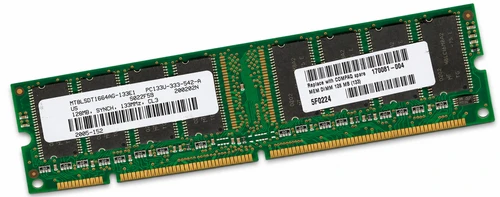
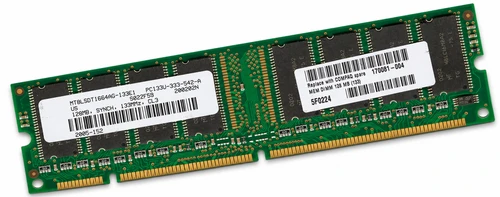
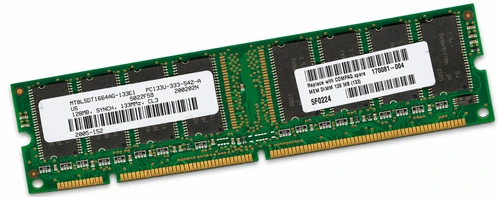
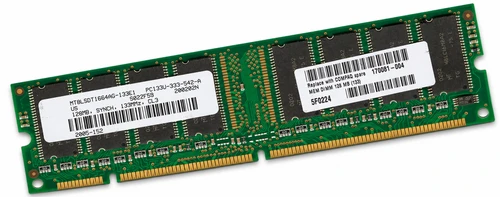
128MB PC133 133MHz 168-Pin Non-ECC SDRAM Memory for OptiPlex GX150 GX240
128MB PC133 SDRAM memory for legacy desktop computers and motherboards that use 168-pin 3.3V non-ECC unbuffered DIMMs. Suitable for replacing an existing memory module or expanding supported OptiPlex, Dimension, Deskpro, Evo, Vectra, NetVista, and other SDRAM-based systems.
This module features a 64-bit memory organization, CL3 timing at 133MHz, and Serial Presence Detect (SPD) for system identification. It can also operate at 100MHz in systems that support the module’s capacity and memory organization.
⭐ Volume Orders Welcome
We have quantities available and welcome bulk orders. Simply place your order online for the quantity you need, and we’ll take care of the rest.
Package Includes
- 1 × 128MB PC133 168-pin non-ECC unbuffered SDRAM memory module
Technical Specifications
- Part Type: Desktop memory module
- Capacity: 128MB
- Memory Technology: SDR SDRAM — synchronous dynamic random-access memory
- Speed Rating: PC133 / PC-133
- Rated Memory Clock: 133MHz
- Form Factor: Full-size DIMM
- Pin Count: 168-pin
- Operating Voltage: 3.3V
- Error Correction: Non-ECC / NECC
- Buffering: Unbuffered
- Data Width: 64-bit
- Module Organization: 16M × 64
- CAS Latency: CL3 at 133MHz
- Rated Timing: 3-3-3 at 133MHz
- Reference Module Rank: Single-rank / 1Rx8
- Reference DRAM Configuration: Eight 16M × 8 memory devices
- SPD: Serial Presence Detect EEPROM
- Lower-Speed Operation: Supports 100MHz operation where permitted by the system
- Quantity: One memory module
Interchangeable / Replacement Part Numbers
The following references identify 128MB PC133 non-ECC unbuffered SDRAM modules or corresponding service and upgrade options. Select replacements according to the system’s supported timing, chip organization, and memory-bank limits.
8E511, 554WF, 170081-004, 170081-001, 140133-001, 168695-001, P1537-63001, P1537-63010, 33L3074, 174224-B21, P1537A, 33L3073, MT8LSDT1664AG-133E1, MT8LSDT1664AG-133B1, MT16LSDT1664AG-133C7, M366S1723CTS-C75, HYM71V16635HCT8-H, HYM71V16635HCLT8-H, HYS64V16300GU-7.5-C2, CPU-KTD-GX150/128, CPU-KTD-DM133/128, CPU-KTC-EN133/128, CPU-KTH-VL133/128, CPU-KTH-PVL133/128, CPU-KTM3071/128, CPU-KVR133X64C3/128, CPU-KVR133X64C3SS/128
✅ Confirmed Compatibility
The systems below have documented support for this memory class. Compatibility is based on the original motherboard and specified SDRAM configuration. Observe the computer’s maximum memory capacity, supported module organization, and DIMM population requirements.
✔️ OptiPlex GX150: Small Form Factor, Small Desktop, Small Mini Tower
✔️ OptiPlex GX240: Small Form Factor, Small Desktop, Small Mini Tower — non-ECC memory configurations
✔️ OptiPlex GX50: SDRAM configurations supporting 128MB DIMMs; memory operates at the system’s supported 100MHz speed
✔️ Dimension 2300 Series: 2300, 2300 LE
✔️ Dimension 4000 Series: 4100, 4300, 4300S
✔️ Dimension 2100 / 2200: Supported 128MB SDRAM configurations operating at 100MHz; follow the original memory population instructions
✔️ Deskpro EN: Models equipped with the i815E chipset and PC133 non-ECC SDRAM
✔️ Deskpro EX / EXS: PC133 SDRAM configurations
✔️ Evo D300: Original SDRAM-equipped configurations
✔️ Evo D300v: Configurations supporting 168-pin non-ECC unbuffered SDRAM
✔️ Evo D500: Original PC133 SDRAM-equipped desktop, small form factor, and convertible minitower configurations
✔️ Presario 7000 Series: 7000US, 7000CA, 7001CL
✔️ Presario 7PL Series: 7PL313
✔️ Vectra VL Series: VL400, VL410 DT
✔️ Vectra XE Series: XE320
✔️ e-PC Series: e-PC 40
✔️ NetVista A20: Machine type 6266
✔️ NetVista A20i: Machine types 2255, 2275, 2276
✔️ NetVista A21: Machine types 6346, 6347, 6348
✔️ NetVista A40: Machine types 6578, 6648, 6830, 6831, 6840
✔️ PC 300GL: Machine type 6574 configurations designated 6xx, 8xx, and 9xx
✔️ eMachines: T4160
Motherboards Supporting 128MB PC133 CL3 Unbuffered SDRAM
✔️ ASUS CUSL2 Series: CUSL2, CUSL2-C
✔️ ASUS TUSL2 Series: TUSL2, TUSL2-C, TUSL2-M
✔️ ASUS CUV4X: CUV4X
✔️ ASUS A7 Series: A7VL-VM, A7VL133-VM, A7V-M
✔️ ABIT: SH6
✔️ AOpen: AX33, AX34
✔️ DFI: CS62-TC, CS32-TC, CS30-TL
✔️ Gigabyte: GA-6OX, GA-6OXT, GA-6OXT-A
✔️ MSI: KM133 / MS-6340M
✔️ SOYO: SY-7VCM, SY-K7VIA
✔️ Supermicro: P3TSSE, P3TSSA, P3TSSR
Memory speed is determined by the motherboard, chipset, processor configuration, and BIOS settings. A PC133-rated module may operate at 100MHz in systems designed for that memory speed.
☑️ Key Features
- 128MB capacity for supported legacy desktop memory upgrades and repairs
- PC133 speed rating with CL3 timing at 133MHz
- Standard 168-pin SDRAM DIMM connection
- 3.3V non-ECC unbuffered design
- Single-rank x8 reference configuration using eight memory devices
- SPD EEPROM provides module information to the system BIOS
- Supports operation at lower memory speeds where permitted by the system
- Cross-references include service spare numbers, upgrade option numbers, and manufacturer module models
- Suitable for maintaining established SDRAM-based computers and motherboards
Applications and Use Cases
- Desktop memory replacement: Replace a failed or missing 128MB SDRAM module in a supported computer.
- Legacy memory expansion: Add memory to an available DIMM slot while remaining within the motherboard’s capacity and bank limits.
- Business computer maintenance: Maintain older OptiPlex, Dimension, Deskpro, Evo, Vectra, and NetVista installations.
- Retro computer restoration: Restore supported desktop systems used for period software, games, and hardware.
- Legacy application support: Maintain computers dedicated to older accounting, inventory, engineering, or other established applications.
- Industrial computer servicing: Service PC-based control or workstation systems whose motherboards specifically require this memory type and organization.
- Repair bench inventory: Keep a suitable SDRAM module available for memory substitution and troubleshooting on supported platforms.
- Fleet maintenance: Standardize replacement inventory across supported systems sharing the same memory requirements.
- Training and hardware education: Support hands-on work with older DIMM-based desktop architectures.
⚙️ Fit Notes
- Match the complete specification: The system must support 128MB 168-pin 3.3V non-ECC unbuffered SDRAM.
- Check the exact motherboard: Similar computer model names can use different memory technologies. The compatibility list applies to the specified SDRAM-equipped versions.
- Confirm the module’s rank and chip organization: Single-rank and dual-rank alternatives can consume different numbers of memory banks. Follow the motherboard’s population rules when combining modules.
- Observe timing requirements: This memory is rated CL3 at 133MHz. Systems requiring CL2 at 133MHz need a module specifically rated for that timing.
- Allow the system to select its supported speed: Installing PC133 memory in a supported 100MHz system does not increase the system’s memory clock to 133MHz.
- Dimension 2100 installation: Follow its original memory instructions, including the restriction against mixing PC100 and PC133 modules.
- Respect maximum capacity: Per-slot and total system limits still apply. For example, the OptiPlex GX150 supports a maximum of 512MB.
- Check populated-bank limits: Some motherboards restrict usable DIMM combinations even when additional physical slots are available.
- Use the correct memory technology: DDR, DDR2, DDR3, DDR4, DDR5, Rambus RIMM, and laptop SO-DIMM modules use different electrical or physical interfaces.
- Check ECC and buffering requirements: This module is intended for non-ECC unbuffered configurations. Systems requiring registered or ECC memory need the appropriate module type.
- Install with power disconnected: Align both DIMM key notches, seat the module fully, and verify that the retaining clips engage.
- Verify recognition after installation: Check the BIOS memory total and run a memory diagnostic before returning the system to service.