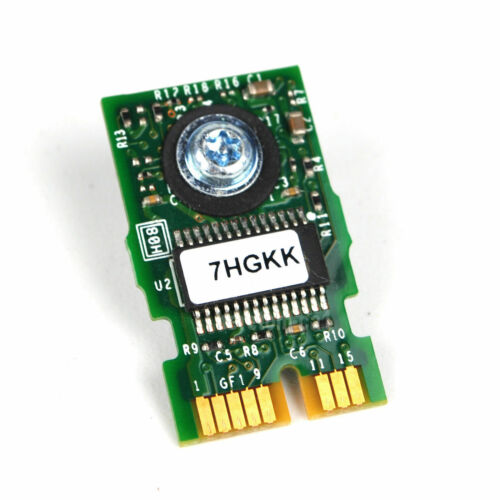
R9X21, 4DP35, 7HGKK - TPM 1.2 FIPS Trusted Platform Module for PowerEdge 13G Servers and Precision Rack 7910
This is a discrete TPM 1.2 security module designed for supported 13th-generation rack, tower, modular, and compute systems. It provides hardware-backed cryptographic key storage, platform authentication, and integrity verification through the system board’s dedicated TPM connector.
Technical Specifications
- Part Number: R9X21
- Module Type: Discrete Trusted Platform Module
- TPM Specification: TPM 1.2
- Platform Generation: 13th Generation / 13G
- Security Standard: FIPS 140-2
- Additional Certifications: TCG and Common Criteria
- Supported Hash Algorithm: SHA-1
- Installation Type: Internal system-board module
- Interface: Dedicated motherboard TPM connector
- Retention Method: System-board plastic security rivet
- Management: System BIOS / UEFI security settings
- Primary Functions: Cryptographic key storage, platform authentication, measured boot, attestation, and drive-encryption support
Interchangeable / Replacement Part Numbers
R9X21, 4DP35, 7HGKK
Order / Option Reference: 461-AAED
Common Label Formats: 0R9X21, 04DP35, 07HGKK
The leading-zero versions and longer strings beginning with CN-0R9X21, CN-04DP35, or CN-07HGKK are label and traceability formats of the corresponding base part numbers—not separate module designs.
✅ Confirmed Compatibility
Compatibility requires a supported 13G system board with the correct TPM connector and TPM 1.2 firmware support. Verify the exact system configuration before installation.
✔️ PowerEdge C-Series: C4130, C6320
✔️ PowerEdge FC-Series: FC430, FC630, FC830
✔️ PowerEdge M-Series: M630, M630 for VRTX, M830, M830 for VRTX
✔️ PowerEdge R-Series: R230, R330, R430, R530, R630, R730, R730xd, R830, R930
✔️ PowerEdge T-Series: T130, T330, T430, T630
✔️ Precision Rack Workstation: Rack 7910, R7910
☑️ Key Features
☑️ Discrete TPM 1.2 hardware-security module
☑️ Designed for supported 13th-generation server platforms
☑️ Hardware-backed protection for cryptographic keys and credentials
☑️ Supports platform authentication and integrity measurements
☑️ Supports compatible drive-encryption and trusted-computing applications
☑️ FIPS 140-2, TCG, and Common Criteria security family
☑️ Direct system-board installation without a separate cable
☑️ Configured and managed through the system BIOS / UEFI
⚙️ Fit Notes
✓ TPM 1.2 and TPM 2.0 are not interchangeable. This module must not be purchased as a TPM 2.0 upgrade.
✓ M48YR, K98XH, 63T69, and G8RRG belong to the TPM 2.0 family and are not replacements for R9X21.
✓ Once enabled, the TPM becomes permanently and cryptographically bound to that specific system board. It cannot be transferred to another system.
✓ Do not attempt to remove an enabled TPM for reuse. Breaking the physical or cryptographic binding can make the module unusable.
✓ Back up all encryption and recovery keys before changing TPM settings. Clearing or initializing a TPM can make encrypted data inaccessible.
✓ Confirm that the system does not already have a provisioned TPM before installation.
✓ Verify that the required plastic security rivet or retaining hardware is available before installation.
✓ TPM installation and initialization should be performed according to the system service documentation by a qualified technician.
✓ BIOS revision, operating system support, security policy, and regional TPM restrictions may affect functionality.