P04002-001 / P03999-001 / P07202-001 - 40mm 12V 6-Pin Cooling Fan for ProLiant DL20 Gen10
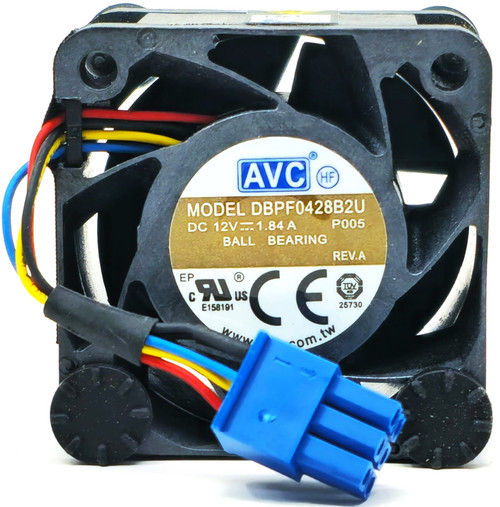
This 40mm server cooling fan is designed for ProLiant DL20 Gen10 1U systems that use fan module P07202-001. It features a 40mm × 40mm × 28mm housing and the matching six-position locking connector.
P04002-001, P03999-001, DBPF0428B2U-P005 and VF40281BX-Q400-Q9I are interchangeable references associated with this fan assembly. The DL20 Gen10 cooling system uses three monitored fan positions; this listing includes one fan module for replacing one failed, noisy or seized fan.
Technical Specifications
- Product Type: Internal server cooling fan
- Fan Style: High-speed axial fan
- Nominal Voltage: 12V DC
- Electrical Rating: 1.84A on DBPF0428B2U-P005 builds
- Alternate Label Rating: 18W on VF40281BX-Q400-Q9I builds
- Fan Dimensions: 40mm × 40mm × 28mm
- Size Classification: 4028
- Fan Lead: Four-wire monitored fan lead
- Connector: Six-position locking server connector
- Connector Dimensions: Approximately 14mm × 10mm
- Cable Length: Approximately 35mm
- Approximate Weight: 1.8 ounces / 51 grams
- Installation Location: Internal server chassis
- System Control: Automatic fan-speed control and monitoring through the system
- Quantity Included: One cooling-fan module
- Application: ProLiant DL20 Gen10 systems using the matching fan assembly
Interchangeable / Replacement Part Numbers
Server spare and assembly references:
P07202-001, P04002-001, P03999-001
Fan label references:
DBPF0428B2U-P005, DBPF0428B2U P005, VF40281BX-Q400-Q9I
Normalized searchable forms:
P07202001, P04002001, P03999001, DBPF0428B2UP005, VF40281BXQ400Q9I
P07202-001 is identified as a fan module in the official parts record.
Electrical ratings printed on the fan label can vary between interchangeable production builds. A different current or wattage marking does not automatically indicate incompatibility, but the server spare number, dimensions, connector, wiring, cable length and mounting orientation must match.
⚠️ Critical Compatibility Notice
This fan is intended for the ProLiant DL20 Gen10, also written as DL20 G10. It should not be ordered for a DL20 Gen10 Plus or DL20 Gen11 solely because the fan appears similar.
DL20 Gen10 Plus systems use a different fan family commonly referenced by P48439-001, P48354-001 or P48352-001.
Before ordering, verify all of the following:
- The installed fan carries P07202-001, P04002-001, P03999-001 or one of the listed fan-label references.
- The fan measures 40mm × 40mm × 28mm.
- The electrical rating is 12V DC.
- The cable terminates in the matching six-position locking connector.
- The wire order and connector keying match the installed fan.
- The cable length and mounting orientation are correct for the selected fan bay.
A generic 40mm 12V fan is not necessarily compatible. Server fan pinouts, locking connectors, speed-control signals and fault-monitoring circuits can differ even when the outside dimensions are identical.
✅ Confirmed Compatibility
Compatibility applies to configurations specifying P07202-001 or one of the interchangeable references listed above.
✔️ ProLiant DL20 Gen10 Server
✔️ ProLiant DL20 G10 Server
✔️ DL20 Gen10 1U rack-server configurations
✔️ DL20 Gen10 with two large-form-factor non-hot-plug drive bays
✔️ DL20 Gen10 with two large-form-factor hot-plug drive bays
✔️ DL20 Gen10 with four small-form-factor hot-plug drive bays
✔️ Fan positions 1, 2 and 3 when the installed module matches P07202-001
✔️ Systems using P04002-001 or P03999-001 fan assemblies
✔️ Systems using DBPF0428B2U-P005 fan-label builds
✔️ Systems using VF40281BX-Q400-Q9I fan-label builds
The supported drive-bay configurations are documented in the DL20 Gen10 configuration specifications. Always verify the installed fan number because component selection can vary by system configuration and service history.
☑️ Key Features
- ☑️ Replaces P07202-001, P04002-001 and P03999-001
- ☑️ Cross-references DBPF0428B2U-P005 and VF40281BX-Q400-Q9I
- ☑️ Compact 40mm × 40mm × 28mm server-fan design
- ☑️ 12V DC operating voltage
- ☑️ Four-wire fan lead for system control and speed monitoring
- ☑️ Six-position locking connector
- ☑️ Supports individual replacement of one failed fan module
- ☑️ Compatible with the listed 2-LFF and 4-SFF chassis configurations
- ☑️ No separate software driver required
⭐➕ Official Service Resources
⚙️ Installation and Fit Notes
- Shut down the operating system and disconnect every power cord before opening the server.
- Allow internal components to cool before servicing the fan area.
- Record the existing fan position, connector location and cable routing before removal.
- Remove the access panel and any air baffle obstructing the selected fan bay according to the service instructions.
- Replace one fan at a time to preserve the correct bay and cable assignment.
- Seat the locking connector completely without forcing it.
- Route the cable away from the fan blades and adjacent components.
- Reinstall every air baffle and the access panel before applying power.
- After startup, verify that the fan operates and that no fan fault is reported by the system-management controller.
- If a fan warning remains, shut the server down and recheck the connector, cable routing and complete part number.
- Do not operate the server with a required fan disconnected or removed.
Includes CPU Medics Standard 30-Day Warranty - Additional Warranty Options Are Available On Item Page.