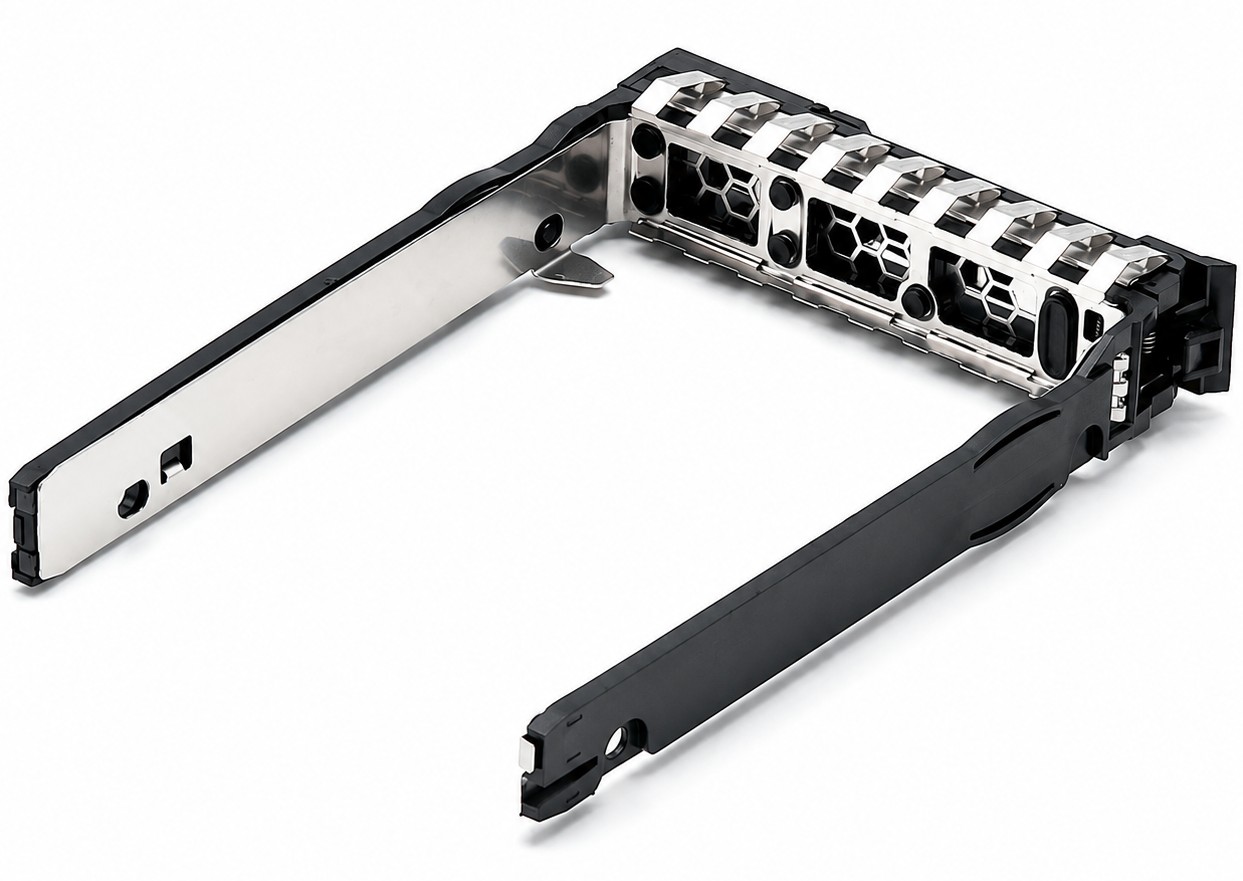
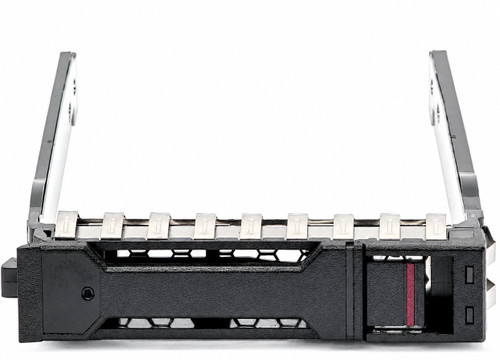
P22892-002 P22892-001 2.5" SFF Basic Carrier Drive Tray for ProLiant Gen10 Plus Gen11
Empty 2.5-inch SFF Basic Carrier drive tray for compatible HPE ProLiant Gen10 Plus and Gen11 servers. This carrier accepts supported 2.5-inch SAS, SATA, U.2, or U.3 drives and provides the correct latch, rails, mounting points, and front-light paths for compatible SFF Basic Carrier drive bays.
The carrier is protocol-neutral. SAS, SATA, or NVMe support is determined by the server’s backplane, controller, cabling, firmware, and drive configuration.
What’s Included
- One 2.5-inch SFF Basic Carrier drive tray
- Four drive-mounting screws
Hard drive, SSD, backplane, drive cage, controller, cables, and server are not included.
Technical Specifications
- Primary Part Number: P22892-002
- Alternate Assembly Number: P22892-001
- Product Type: Empty server drive tray / caddy
- Carrier Family: HPE Basic Carrier / BC
- Drive Form Factor: 2.5-inch SFF
- Compatible Media: Supported 2.5-inch HDDs and SSDs
- SAS Support: Yes, when installed in a compatible SAS Basic Carrier bay
- SATA Support: Yes, when installed in a compatible SATA Basic Carrier bay
- NVMe Support: U.2 or U.3 NVMe when supported by the server’s backplane, controller, cabling, and firmware
- Tri-Mode Support: Compatible with supported SAS/SATA/NVMe U.3 Tri-Mode Basic Carrier configurations
- Drive Attachment: Four side-mounted screws
- Bay Installation: Lever-actuated latch for tool-free carrier insertion and removal
- Construction: Molded front bezel and latch with metal side rails
- Front Indicators: Integrated openings/light paths for compatible drive activity, online, fault, and locate indicators
- Hot-Plug Capability: Supported when used with a compatible hot-plug Basic Carrier bay and properly configured storage subsystem
- Protocol Conversion: None; the installed drive connects directly to the server backplane
- External Cabling Required: No
- Included: Basic Carrier tray and four mounting screws
Interchangeable / Replacement Part Numbers
P03761-001, P03761-002, P22892-001, P22892-002
These numbers identify interchangeable versions of the same 2.5-inch SFF Basic Carrier tray family.
Related Basic Carrier Backplane and Drive Cage References
Reference only—backplanes and drive cages are not included.
- ProLiant DL360 Gen10 Plus: P26427-B21 8SFF SAS/SATA BC, P26431-B21 8SFF x1 Tri-Mode U.3 BC, P26429-B21 8SFF x4 Tri-Mode U.3 BC
- ProLiant DL365 Gen10 Plus: P38581-B21 2SFF U.3 Basic Carrier premium backplane
- ProLiant DL360 Gen11: P48895-B21 8SFF x1 U.3, P48896-B21 8SFF x4 U.3, P48899-B21 2SFF x4 U.3
- ProLiant DL380 Gen11: P48813-B21 2U 8SFF x1 Tri-Mode U.3 drive cage
- ProLiant DL320 Gen11: P52743-B21 8SFF x1 U.3, P52747-B21 8SFF x4 U.3, P52751-B21 2SFF x4 U.3
- ProLiant DL325 Gen11: P54999-B21 8SFF x1 U.3, P55000-B21 8SFF x4 U.3, P56652-B21 2SFF x4 U.3
- ProLiant DL385 Gen11: P55082-B21 8SFF x1 U.3, P55083-B21 8SFF x4 U.3
- ProLiant ML350 Gen11: P47217-B21 8SFF x1 Tri-Mode U.3 drive cage
Installing this carrier does not add NVMe capability. NVMe requires the appropriate U.2/U.3 backplane, controller or PCIe connection, cables, firmware, and supported drive.
⭐ Large Volume / Bulk Purchase Ready
We regularly fulfill very large order quantities for data-center deployments, fleet upgrades, refurbishment programs, resellers, system integrators, and spare-parts inventories. Feel confident placing high-volume orders directly through the store.
For exceptionally large or scheduled-release requirements, contact us to coordinate availability and delivery timing.
✅ Confirmed Compatibility
Compatibility depends on the server’s exact drive cage and backplane—not merely the server model. The following systems are compatible only when equipped with a 2.5-inch SFF Basic Carrier drive configuration. This tray does not fit Smart Carrier, 3.5-inch LFF, or EDSFF bays.
✔️ ProLiant Gen10 Plus Rack Servers: DL20 Gen10 Plus, DL325 Gen10 Plus, DL325 Gen10 Plus v2, DL345 Gen10 Plus, DL360 Gen10 Plus, DL365 Gen10 Plus, DL380 Gen10 Plus, DL385 Gen10 Plus v2
✔️ ProLiant Gen10 Plus Tower Servers: ML30 Gen10 Plus with the 8SFF hot-plug Basic Carrier configuration
✔️ ProLiant Gen11 Rack Servers: DL20 Gen11, DL320 Gen11, DL325 Gen11, DL345 Gen11, DL360 Gen11, DL365 Gen11, DL380 Gen11, DL380a Gen11, DL385 Gen11
✔️ ProLiant Gen11 Tower Servers: ML30 Gen11, ML110 Gen11, ML350 Gen11
✔️ HPE Synergy Gen11: Synergy 480 Gen11 Compute Module configurations using SFF Basic Carrier drives
✔️ Supported Drive-Bay Types: SAS/SATA Basic Carrier bays and U.2/U.3 NVMe or Tri-Mode Basic Carrier bays appropriate for the installed drive
☑️ Key Features
☑️ Direct replacement for P03761 and P22892 Basic Carrier trays
☑️ Accepts supported 2.5-inch SFF hard drives and solid-state drives
☑️ Compatible with SAS and SATA Basic Carrier configurations
☑️ Supports NVMe drives when paired with the proper U.2/U.3 backplane and hardware
☑️ Lever-actuated latch provides positive engagement with the drive bay
☑️ Tool-free carrier insertion and removal
☑️ Four included screws secure the drive to the metal side rails
☑️ Vented front design supports airflow through high-density drive cages
☑️ Front light paths preserve compatible activity, online, fault, and locate indication
☑️ Suitable for replacing missing, broken, cracked, or damaged drive carriers
☑️ Common carrier family across supported Gen10 Plus and Gen11 SFF platforms
☑️ Well suited for large deployments and maintaining standardized spare-drive inventories
⚙️ Fit Notes
✓ Confirm that the server has an SFF Basic Carrier / BC drive cage. A 2.5-inch drive bay alone does not guarantee compatibility.
✓ This carrier is not compatible with 3.5-inch LFF bays. A system with an LFF cage requires a compatible 3.5-inch carrier or an approved 2.5-inch-to-3.5-inch adapter.
✓ Most Gen10 non-Plus SFF systems use the older Smart Carrier family. Smart Carrier trays such as 727695-001 and 651687-001 have a different front, latch, indicator arrangement, and drive-cage interface.
✓ The original DL385 Gen10 Plus uses Smart Carrier drive cages. The DL385 Gen10 Plus v2 changed to Basic Carrier cages and is the compatible version listed above.
✓ The carrier itself does not determine whether a drive operates as SAS, SATA, U.2 NVMe, or U.3 NVMe. The installed backplane, controller, cables, firmware, and server configuration must support the selected drive.
✓ A Tri-Mode U.3 backplane can support multiple drive protocols only when connected to compatible Tri-Mode storage hardware and correctly cabled.
✓ The bay latch is tool-free, but mounting the drive inside the carrier requires the four included screws and an appropriate screwdriver.
✓ Carrier fit does not guarantee that a particular drive model, capacity, interface, power requirement, or firmware is supported by the server. Verify the drive separately.
✓ Hot-plug removal is only appropriate when the server, drive, controller, RAID configuration, and operating system support it. Never remove an active drive without confirming its status and following the proper replacement procedure.
✓ The carrier contains no independent status electronics. Front indication depends on the drive, backplane, system firmware, and server-management configuration.
Includes CPU Medics Standard 30-Day Warranty - Additional Warranty Options Are Available On Item Page.