KP561 - Motherboard System Board for OptiPlex 330 Desktop
Description
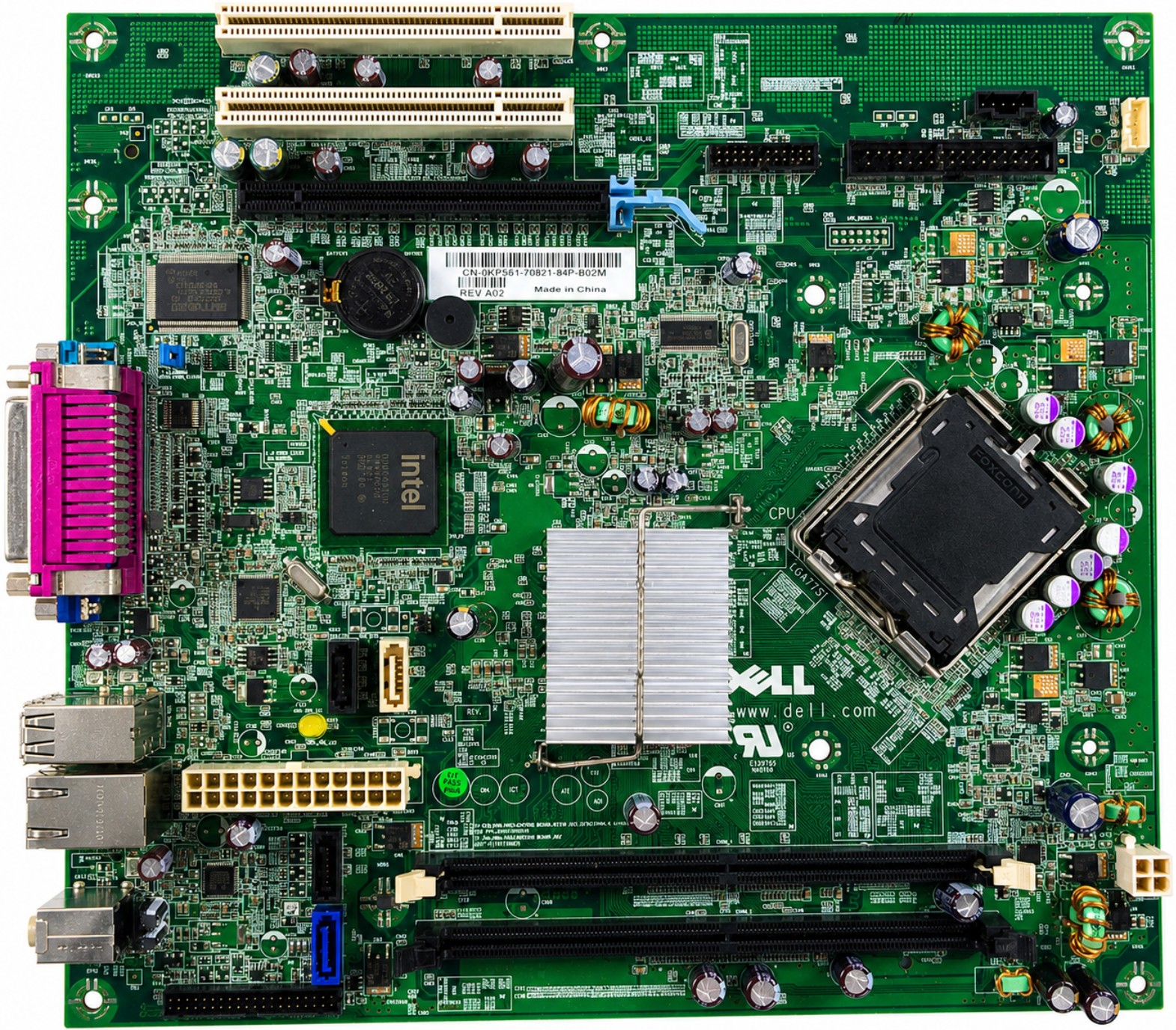
Replacement motherboard / system board for compatible OptiPlex 330 desktop systems using the KP561 / 0KP561 board layout. This board is designed for the LGA775 platform with Intel G31 Express chipset, DDR2 desktop memory support, integrated VGA video, integrated Ethernet, four SATA drive connectors, one PCI Express x16 slot, and two legacy PCI expansion slots.
What’s Included
- Motherboard / System Board: KP561 / 0KP561 board only
- Not Included: CPU, heatsink, fan, memory, rear I/O shield, riser card, cables, screws, drives, operating system, or software
Technical Specifications
- Primary Part Number: KP561
- Alternate Board Number: 0KP561
- Board Label Format: CN-0KP561
- Part Type: Desktop motherboard / system board
- Compatible Platform: OptiPlex 330 desktop platform
- Processor Socket: LGA775 / Socket T
- Supported Processor Family: Intel Core 2 Duo, Pentium Dual-Core, Celeron, and compatible LGA775 processors supported by the system BIOS
- Chipset: Intel G31 Express Chipset with ICH7R
- Memory Type: DDR2 SDRAM
- Memory Speed: 667MHz / 800MHz DDR2
- Memory Slots: 2x DDR2 DIMM slots
- Supported Memory Modules: 512MB, 1GB, and 2GB non-ECC DDR2 modules
- Maximum Memory: 4GB officially supported
- ECC Support: No, non-ECC only
- Buffered / Registered Memory Support: No, unbuffered memory only
- Graphics: Integrated VGA video output
- Network: Integrated 10/100/1000 Ethernet LAN
- Expansion Slot 1: 1x PCI Express x16 slot
- Expansion Slots 2-3: 2x PCI 2.3 slots
- Storage Connectors: 4x SATA 7-pin connectors
- Floppy Connector: 1x 34-pin floppy drive connector
- Rear Video Port: 1x VGA
- Rear Network Port: 1x RJ-45 Ethernet
- Rear USB Ports: 6x USB 2.0
- Front USB Support: 2x front-panel USB through chassis front I/O
- Rear Serial Port: 1x DB9 serial
- Rear Parallel Port: 1x DB25 parallel
- Rear Audio Ports: Line-in / microphone and line-out
- Front Audio Support: Headphone and microphone through chassis front I/O
- Main Power Connector: 24-pin ATX-style system power connector
- CPU Power Connector: 4-pin 12V processor power connector
- Front Panel Connector: 40-pin front panel connector
- Fan Connector: 5-pin CPU fan connector
- Battery Type: CR2032 coin-cell battery
- Installation Type: Internal screw-mounted desktop system board
Interchangeable / Replacement Part Numbers
KP561, 0KP561, CN-0KP561,
Recommended Thermal Paste for CPU Installation
Fresh thermal compound is recommended when transferring or reinstalling a CPU and heatsink on this motherboard. We recommend Shin-Etsu G751 Microsi High Performance Thermal Grease / Thermal Paste - sold separately.
✅ Confirmed Compatibility
Please note that the following list is not exhaustive. Compatibility depends on your system’s specific configuration. It’s essential to verify compatibility with your original motherboard part number, chassis style, rear I/O layout, expansion slot layout, memory type, CPU socket, power connectors, and front-panel connector before installation.
✔ OptiPlex Desktop Models: OptiPlex 330 Desktop / DT
✔ Matching 330 Platform Chassis: OptiPlex 330 systems using the same KP561 / 0KP561 board label, rear I/O port layout, LGA775 CPU socket, two DDR2 DIMM slots, four SATA connectors, one PCI Express x16 slot, two PCI slots, and matching front-panel / power connector layout
✔ Matching Regulatory Platform IDs: DCSM / DCNE platform systems when the original motherboard part number and board layout match
☑️ Key Features
☑️ Replacement motherboard / system board for compatible OptiPlex 330 desktop systems
☑️ LGA775 CPU socket for supported Intel Core 2 Duo, Pentium Dual-Core, and Celeron processors
☑️ Intel G31 Express chipset with ICH7R platform controller
☑️ Two DDR2 DIMM slots supporting 667MHz / 800MHz non-ECC memory
☑️ Four SATA connectors for hard drives and optical drives
☑️ Integrated VGA video output for standard display connection
☑️ Integrated Gigabit Ethernet LAN port
☑️ Includes one PCI Express x16 slot and two PCI slots for compatible expansion cards
☑️ Rear legacy I/O includes serial, parallel, VGA, USB, Ethernet, and audio ports
☑️ Direct-fit replacement when the original board label matches KP561 / 0KP561 and the chassis layout matches
☑️ Recommended to use fresh thermal paste when reinstalling the CPU and heatsink
⚙️ Fit Notes
✓ Match your original motherboard part number whenever possible.
✓ Confirm the board label shows KP561, 0KP561, or CN-0KP561 before replacing.
✓ Compare the rear I/O ports carefully: serial, parallel, VGA, USB, Ethernet, and audio layout must match your original board.
✓ Confirm your system uses an LGA775 processor and DDR2 desktop memory.
✓ This board does not support DDR, DDR3, DDR4, ECC, registered, or laptop memory.
✓ This board supports non-ECC unbuffered DDR2 memory only.
✓ Official memory support is up to 4GB using supported 512MB, 1GB, or 2GB DDR2 modules.
✓ Confirm your chassis uses the same front-panel connector, CPU fan connector, SATA connector positions, and mounting screw pattern.
✓ Do not order based only on the computer model name. Similar systems may use different boards with different ports, slots, or chassis wiring.
✓ If transferring your existing CPU and heatsink, clean off the old thermal compound and apply fresh Shin-Etsu G751 thermal paste before reinstalling the heatsink.
✓ BIOS version may affect CPU support, memory behavior, and startup compatibility.
✓ Board replacement should be performed with AC power disconnected and the system fully discharged.