A98L-0001-0518#M - Membrane Operator Keypad Keysheet for Fanuc 0-M 15M MDI Keyboard
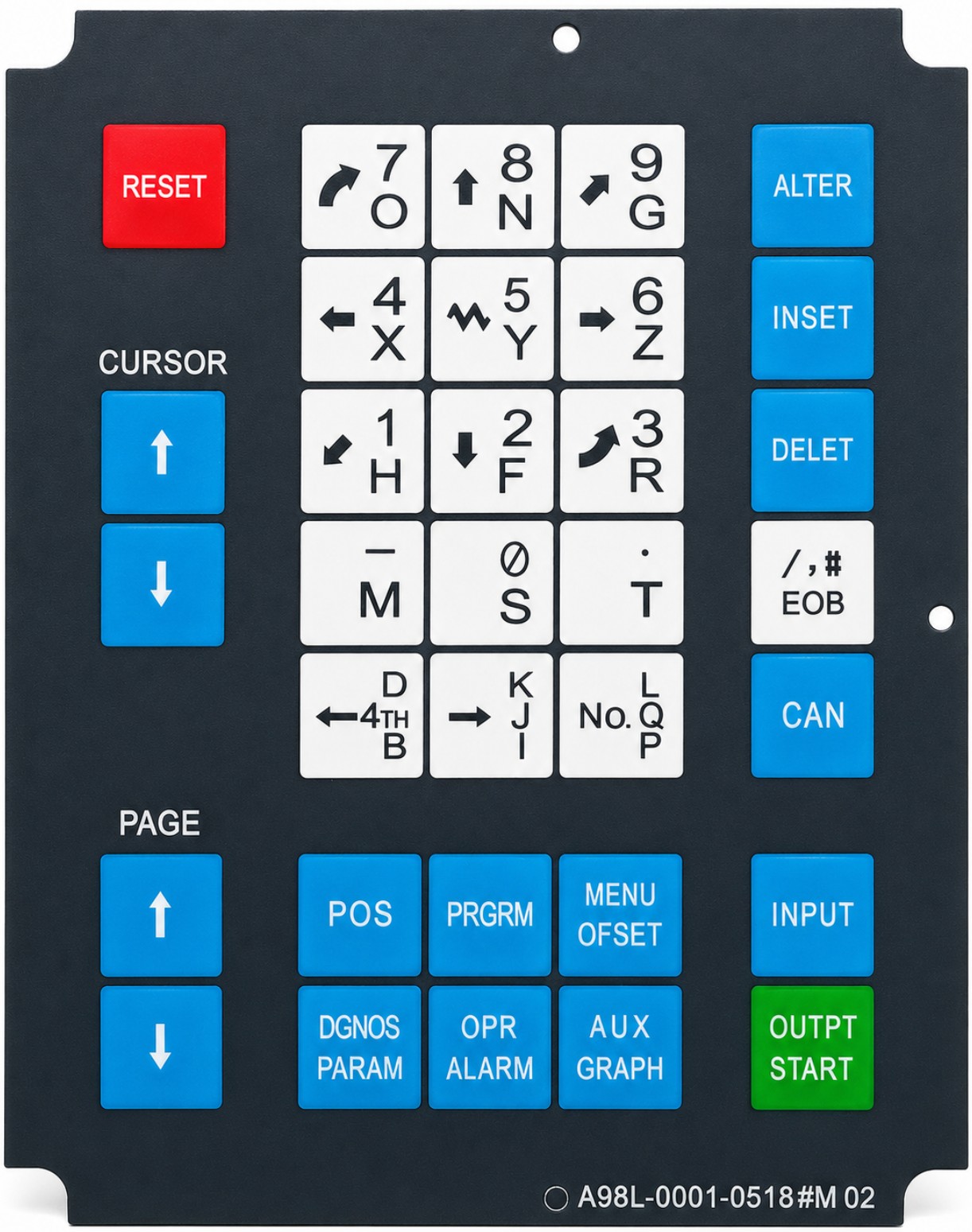
Replacement membrane operator keypad keysheet for compatible Fanuc MDI / CRT keyboard panels using the A98L-0001-0518#M layout. This is the #M version used for compatible M / machining center / mill-style operator panels and is designed to restore worn, faded, cracked, peeling, or non-responsive front keypad overlays on matching control panels.
What’s Included
- Included Item: 1x membrane operator keypad keysheet
Technical Specifications
- Primary Part Number: A98L-0001-0518#M
- Alternate Printed Part Number: A98L-0001-0518#M02
- Part Type: Membrane operator keypad keysheet
- Application: CNC operator panel / MDI keyboard overlay
- Layout Version: #M
- Control Style: M / machining center / mill layout
- Keysheet Style: Front membrane overlay
- Keyboard Type: Operator keyboard / MDI keypad membrane
- Panel Type: 9-inch MDI / CRT style operator unit
- Keypad Layout: 33-key style operator panel layout
- Faceplate Color: Dark panel / black
- Key Colors: Blue, white, red, and green labeled keys
- Installation Type: Front-applied replacement keysheet for compatible keyboard assemblies
- Application Use: Replacement for worn, damaged, faded, peeling, cracked, or non-responsive original membrane overlays
Layout & Key Function Details
- Reset Key Area: RESET
- Cursor Key Area: Cursor up and cursor down keys
- Page Key Area: Page up and page down keys
- Alphanumeric / Entry Key Area: 7/O, 8/N, 9/G, 4/X, 5/Y, 6/Z, 1/H, 2/F, 3/R, -/M, 0/S, ./T, 4TH/B, K/J/I, L/No./Q/P
- Edit / Command Key Area: ALTER, INSET, DELET, EOB, CAN, INPUT
- Function Key Area: POS, PRGRM, MENU OFSET, DGNOS PARAM, OPR ALARM, AUX GRAPH
- Output Key Area: OUTPT START
Interchangeable / Replacement Part Numbers
A98L-0001-0518#M, A98L00010518#M, A98L-0001-0518#M02, A98L00010518#M02
✅ Confirmed Compatibility
Please note that the following list is not exhaustive. Compatibility depends on your control’s exact keypad layout, original membrane part number, suffix version, mounting shape, and operator panel style. It is essential to compare the original membrane to the photo and printed part number before ordering.
✔ Fanuc 0-M Series Controls: 0-M, 0M-A, 0M-B, 0M-C, 0M-D, 0M-F
✔ Fanuc 15M Series Controls: 15M, 15MA, compatible 15M machining-center style operator panels using the same #M keypad layout
✔ Fanuc MDI / CRT Operator Units: Compatible 9-inch MDI / CRT keyboard panels using the A98L-0001-0518#M membrane layout
✔ Machining Center / Mill Operator Panels: Compatible M-designation keyboard layouts used on milling and machining-center applications
✔ Fanuc M-Style Keyboard Panels: Compatible operator keyboards using the same #M legend set, key arrangement, and front membrane format
☑️ Key Features
☑️ Replacement membrane keysheet for compatible Fanuc MDI / CRT operator keyboards
☑️ Correct #M version for compatible M / machining center / mill panel layouts
☑️ Helps restore worn, faded, cracked, peeling, or damaged keypad overlays
☑️ Restores key legend visibility and operator panel appearance
☑️ Front membrane style replacement for compatible keyboard assemblies
☑️ Useful for maintenance, refurbishment, and CNC control panel restoration projects
☑️ Includes the operator key layout used for compatible 0-M and 15M M-style panels
☑️ Direct-fit replacement when the original part number, suffix, and key layout match
⚙️ Fit Notes
- Match your original membrane part number whenever possible
- Confirm your original keypad is marked A98L-0001-0518#M or A98L-0001-0518#M02
- This is the #M version intended for M / machining center / mill keyboard layouts
- Compare the full key layout, printed legends, key colors, outer shape, and mounting pattern before ordering
- This is not the same as #T, #TR, or other turning / lathe style membrane variants
- This listing is for the membrane keysheet only
- Keyboard assembly, CRT unit, display, PCB, pendant, cabinet, and machine electronics are not included unless shown
- Make sure the underlying switches / contacts and keyboard assembly are functional before replacing only the front membrane
- Installation may require careful removal of the original overlay and cleaning of the mounting surface before applying the replacement
- Always power down the control and follow proper service procedures before replacing operator panel components